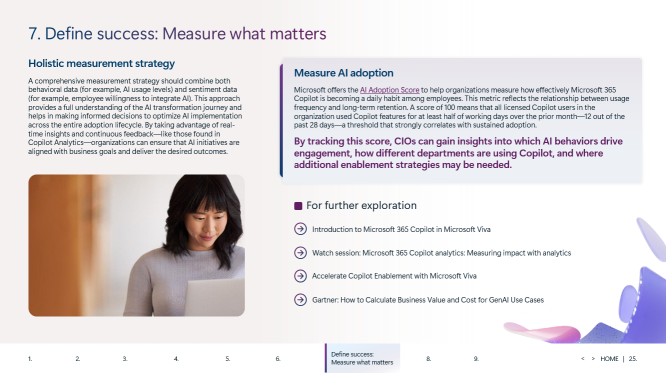
How should we measure the success of our Microsoft 365 Copilot rollout?
To understand whether Microsoft 365 Copilot is truly adding value, you’ll want to measure both what people do and how they feel about it.
1. Combine behavioral and sentiment data
- **Behavioral data**: Track usage levels and patterns—how often people use Copilot, which features they rely on, and how usage trends change over time.
- **Sentiment data**: Capture how willing employees are to integrate AI into their work, how confident they feel using it, and where they see gaps. This can come from surveys, feedback forms, and interviews.
Looking at these together gives you a more complete view of your AI transformation—not just whether Copilot is turned on, but whether it’s actually helping people work differently.
2. Use AI Adoption Score as a key metric
Microsoft provides an **AI Adoption Score** to show how effectively Copilot is becoming a daily habit:
- The score reflects the relationship between **usage frequency** and **long‑term retention**.
- A score of **100** means all licensed Copilot users used Copilot features on **at least half of their working days over the prior month** (12 out of the past 28 days).
- This threshold strongly correlates with **sustained adoption**, not just initial curiosity.
By tracking this score, CIOs and business leaders can:
- See which **AI behaviors** drive engagement.
- Compare **adoption across departments** or roles.
- Identify where **additional training, enablement, or change management** is needed.
3. Leverage analytics and continuous feedback
Tools like **Copilot Analytics** and related Microsoft Viva capabilities provide **real‑time insights** into how Copilot is used. When you pair these analytics with ongoing employee feedback, you can:
- Adjust training and communication quickly.
- Align AI initiatives with **specific business goals** (for example, faster document creation, better insights from data, or reduced support tickets).
- Track whether AI is helping you reach the outcomes you care about—such as productivity gains, better decision‑making, or improved employee experience.
In short, define success up front, measure both usage and sentiment, and use the AI Adoption Score plus analytics to continuously tune your Copilot rollout.
What are AI agents in Microsoft 365 Copilot, and how do they evolve over time?
In the Microsoft 365 Copilot context, **AI agents** are systems that combine perception, cognition, and action to perform complex jobs that previously required human effort. They go beyond simple question‑and‑answer interactions and can:
- Perceive and understand information.
- Identify patterns and make sense of data.
- Reason, plan, and solve problems.
- Make decisions and use tools.
They can live inside the Copilot experience or operate more autonomously in the background to complete business processes.
### The three‑phase journey to AI‑first work
Microsoft describes a progression toward becoming an AI‑first, or “Frontier Firm,” organization:
1. **Phase 1 – Human‑first assistants**
AI acts as an assistant that helps people do the same work **better and faster**. Copilot supports tasks like drafting content, summarizing meetings, or answering questions, but humans remain fully in control of the work.
2. **Phase 2 – Delegating work to agents**
Employees begin to **delegate larger bodies of work** to agents. For example, a **researcher agent** might create an end‑to‑end marketing plan and return it for human review. People shift from doing every step themselves to supervising and refining the output.
3. **Phase 3 – Leading teams of autonomous agents**
Humans oversee **teams of agents** that perform work on behalf of a team or function. Agents collaborate with each other, assign tasks, and operate more like **digital colleagues**.
Throughout this journey, Microsoft emphasizes **human‑centered AI**: people and organizations decide how and when to use agents, and employees remain at the center of the experience.
### Types of agents in the Microsoft 365 ecosystem
As your strategy matures, you’ll likely use a mix of agents:
1. **Retrieval agents**
- Follow predefined rules, instructions, and objectives.
- Focus on **finding and presenting information** from your knowledge sources.
- Often used for scenarios like policy lookup or knowledge base search.
2. **Task agents**
- Connect to specific **workflows or processes**.
- Use knowledge, skills, and rule‑based automation to **complete repetitive tasks**.
- Ideal for routine approvals, simple request handling, or structured process steps.
3. **Autonomous agents**
- Operate more independently, **planning and learning** from the processes they run.
- Adapt to changing conditions and make decisions without constant human input.
- Suitable for more complex, end‑to‑end processes.
### Deep reasoning and specialized agents
New capabilities bring **deep reasoning** into Microsoft 365 Copilot via **Copilot Studio**:
- Agents can combine reasoning models (such as the Azure OpenAI o1 model) with **enterprise data** to handle more complex tasks with greater accuracy.
- **Researcher agent**:
- Acts like a high‑level research analyst.
- Navigates and reasons over emails, chats, meeting recordings, documents, line‑of‑business apps, and the web.
- Produces strategic insights and informed recommendations, saving employees significant time.
- **Analyst agent**:
- Functions as a “**data scientist in a box**” built into Microsoft 365.
- Uses a **Python reasoning engine** to analyze complex data across documents and spreadsheets.
- Generates advanced data visualizations and helps users uncover insights from their work data.
Across all of these, Copilot remains the **user interface for AI**, giving employees a familiar way to interact with agents while keeping humans in charge of decisions and outcomes.
How can AI agents improve employee self‑service for HR and IT?
Microsoft uses generative AI internally as a practical example of how agents can reshape employee self‑service.
### The Employee Self‑Service Agent in Copilot
Microsoft has deployed an **Employee Self‑Service Agent** within Copilot to streamline HR and IT support. The goal is to help employees:
- Find information quickly (for example, policies and how‑to guides).
- Navigate previously siloed systems more easily.
- Complete routine HR and IT tasks without always filing a support ticket.
The agent uses **retrieval‑augmented generation (RAG)** to:
- Pull information from multiple internal sources.
- Provide **instant, context‑aware answers** directly in Microsoft 365.
- Guide employees through actions like submitting requests or resolving common IT issues.
### Business impact
By shifting routine queries and tasks to the Employee Self‑Service Agent, Microsoft has seen:
- An **increase in self‑help success**, as more employees can resolve issues on their own.
- An **improvement in information discovery**, since employees no longer need to hunt through multiple systems.
- A **boost in IT user satisfaction**, as response times improve and support feels more accessible.
At the same time, human HR and IT support teams benefit because:
- **Ticket volume for routine requests goes down**, freeing them to focus on higher‑priority or more complex issues.
- They can spend more time on strategic work instead of repetitive questions.
This “customer zero” example shows how organizations can reimagine internal support by:
1. Starting with retrieval‑focused agents for policy and knowledge lookup.
2. Gradually connecting agents to workflows for task completion.
3. Using analytics and feedback to refine the experience and measure improvements in self‑service and satisfaction.




 Sign in with LinkedIn